📝 Lưu ý: Đây là phiên bản tiếng Việt. Vui lòng dịch nội dung bên dưới.
Remember when search meant keyword matching and hoping for the best? You’d type “machine learning algorithms” and get back documents that happened to contain those exact words — even if they were talking about something completely different. Then you had chatbots that could only answer questions based on what they were explicitly trained on, with zero ability to tap into your company’s latest reports or documentation.
Well, those days are rapidly fading! Enter RAG (Retrieval-Augmented Generation) — a game-changing technique that lets AI models access and reason over your own documents in real-time. Suddenly, your chatbot can answer questions about last quarter’s sales report, your support docs, or your entire knowledge base, while still maintaining the conversational intelligence of a large language model.
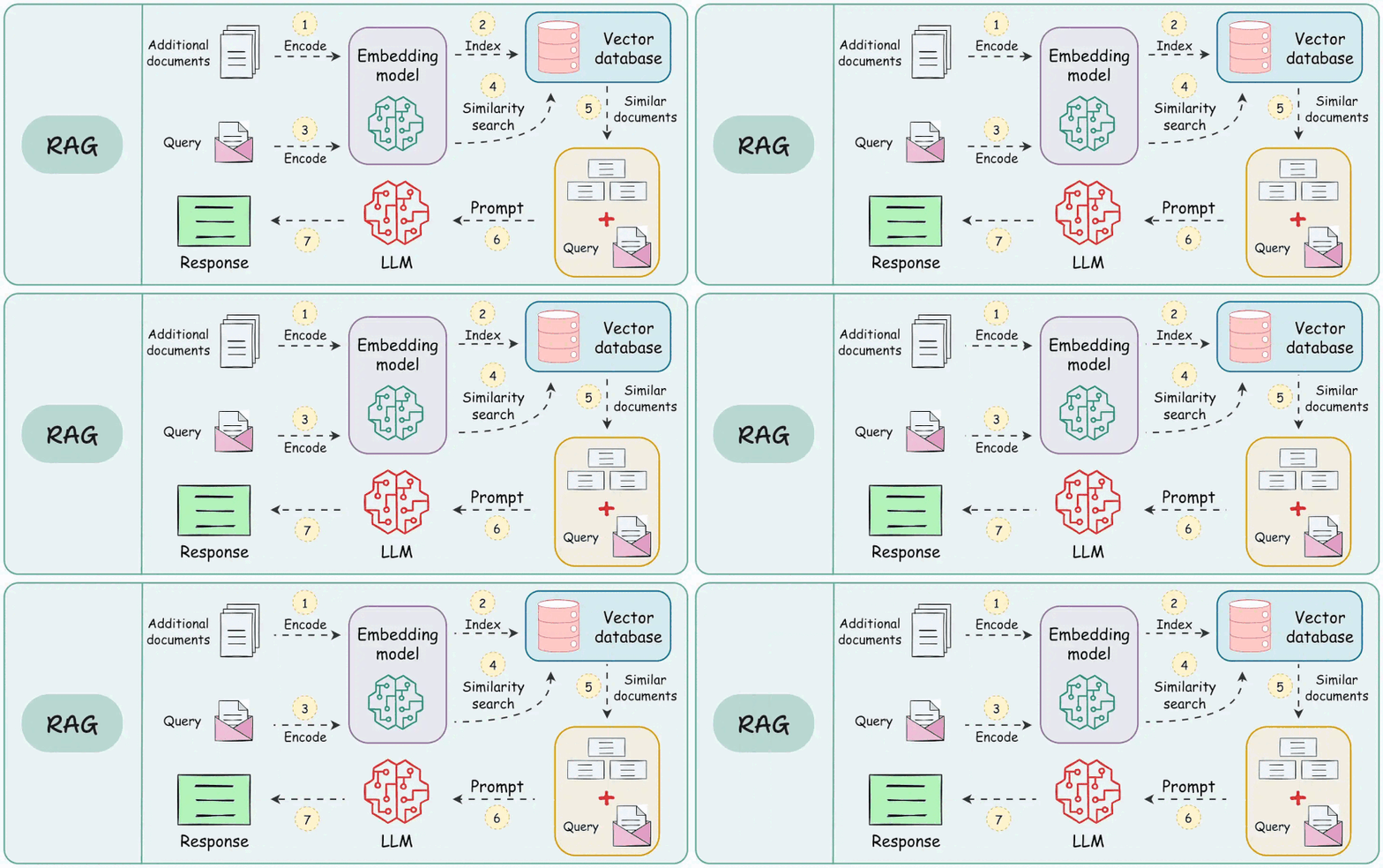
Here’s the thing though: RAG has moving parts, and they all need to work together smoothly. You’ve got chunking strategies to choose from, vector embeddings to understand, databases to configure, and retrieval pipelines to optimize. If you’re looking at tutorials that just show you the final code without explaining why things work the way they do, it’s easy to feel lost.
This guide is different. We’re going to build understanding from the ground up — concept by concept, component by component. By the end, you’ll not only know how to build a RAG system, but you’ll genuinely understand what’s happening under the hood. Ready to dive in? Let’s go!
What We’re Covering
- Chunking — breaking documents into searchable pieces
- Embeddings — turning text into semantic vectors
- Vector Database — storing and searching embeddings at scale
- Retrieval Strategies — finding the most relevant chunks
- Answer Generation — combining retrieval with LLMs
01. Chunking — Breaking Documents Into Searchable Pieces
The Problem It Solves
Imagine you upload a 50-page technical manual to your system. Now someone asks: “How do I reset the device?” The answer might be buried somewhere on page 34, in a single paragraph. But here’s the catch: you can’t just dump all 50 pages into an AI model as context — that would exceed token limits and cost a fortune. Plus, the AI would struggle to focus on what actually matters when drowning in irrelevant information.
That’s where chunking comes in! You split that massive document into bite-sized, meaningful pieces — maybe 500 characters each, maybe full paragraphs, maybe semantically coherent sections. Now when someone asks a question, you can retrieve just the 3-5 most relevant chunks and feed those to the AI. Efficient, focused, and actually works!
Think of it this way: Chunking is like organizing a massive library. You don’t hand someone the entire encyclopedia when they ask about tigers — you point them to the specific volume, chapter, and page. Same idea! You’re creating an index that makes finding the right information lightning-fast.
The Five Chunking Strategies
Different documents need different approaches. Here are your five main options:
1. Fixed-Size Chunking (Best for general purpose)
Split text into equal-sized chunks with optional overlap. Simple, predictable, and works surprisingly well for most cases.
// Example: 500 characters per chunk, 50 character overlap
{
  "strategy": "fixed",
  "chunkSize": 500,
  "overlap": 50
}

// Result:
// Chunk 1: [0-500]
// Chunk 2: [450-950]   ← overlaps with chunk 1!
// Chunk 3: [900-1400]
Pros: Consistent sizes, fast, predictable Cons: May split sentences or concepts awkwardly
2. Sentence-Based Chunking (Best for Q&A)
Group complete sentences together until you hit a target size. Never splits mid-sentence!
// Groups sentences up to ~500 chars
{
  "strategy": "sentence",
  "targetSize": 500,
  "maxSize": 800
}

// Result:
// Chunk 1: "The cat sat on the mat. It was a sunny day. Birds were singing."
// Chunk 2: "Suddenly, a dog appeared. The cat jumped up quickly."
Pros: Coherent, natural boundaries Cons: Variable chunk sizes
3. Paragraph-Based Chunking (Best for structured docs)
Keeps full paragraphs together, preserving the author’s intended structure.
{
  "strategy": "paragraph",
  "minSize": 100,
  "maxSize": 1000
}
Pros: Preserves document structure, maintains context Cons: Highly variable sizes
4. Semantic Chunking (Best for complex topics)
The smartest option! Combines sentence and paragraph awareness with intelligent overlap at natural boundaries.
{
  "strategy": "semantic",
  "targetSize": 500,
  "overlapSentences": 1
}
Pros: Best context preservation, natural splits Cons: More complex, computationally expensive
5. Token-Based Chunking (Best for LLM limits)
Splits by token count (roughly 4 characters = 1 token) to precisely fit within model context windows.
{
  "strategy": "token",
  "maxTokens": 500,
  "overlapTokens": 50
}
Pros: Precise control for LLM constraints Cons: Approximate (uses character estimation)
When to Use Which Strategy
| Strategy | Use When… |
|---|---|
| Fixed | General-purpose docs, balanced performance |
| Sentence | Q&A systems, chatbots, natural conversation |
| Paragraph | Well-structured documents (reports, articles) |
| Semantic | Complex topics needing maximum context |
| Token | Strict model token limits (GPT-3.5, etc.) |
The Magic of Overlap
Here’s a pro tip that makes a huge difference: always add overlap between chunks! Why? Because answers often span boundaries. If you split “The device can be reset by holding the power button for 10 seconds” right down the middle, neither chunk makes complete sense. But with 50-100 characters of overlap, both chunks contain the full answer.
Real-world analogy: Overlap is like having subtitles on a video that linger for a second after the speaker moves on. It creates continuity and ensures you never miss context, even when the scene changes!
⚠️ Watch out! Chunks that are too small (<100 chars) lose context and meaning. Chunks that are too large (>2000 chars) reduce precision — you’ll retrieve too much irrelevant information. The sweet spot for most use cases? 300-800 characters with 10-20% overlap.
02. Embeddings — Turning Text Into Semantic Vectors
The Problem It Solves
Computers don’t understand meaning — they only understand numbers. If you ask “How do I reset my password?” and a document says “Follow these steps to regain account access,” traditional keyword search would fail miserably (zero matching words!). But humans instantly recognize these are related concepts.
Embeddings solve this by converting text into high-dimensional numerical vectors that capture semantic meaning. Similar concepts end up close together in vector space, even if they use completely different words. It’s like giving the computer a “meaning compass” that points similar ideas toward each other!
Picture this: Imagine a vast 3D space (actually 768 dimensions, but let’s keep it simple). Every possible concept has a location in this space. “Cat” and “kitten” are super close neighbors. “Cat” and “quantum physics” are on opposite sides of the universe. When you embed text, you’re finding its coordinates in this semantic space. Now searching becomes as simple as finding neighbors!
How Embeddings Work
The embedding model (nomic-embed-text in our case) takes any text string and outputs a 768-dimensional vector — basically a list of 768 numbers between -1 and 1.
// Input text
"Machine learning is a subset of artificial intelligence"

// Gets converted to:
[0.234, -0.456, 0.678, 0.123, -0.891, ..., 0.045]
//  ^---- 768 numbers total ----^

// Similar text produces similar vectors!
"AI and ML are related fields"
[0.241, -0.449, 0.685, 0.135, -0.883, ..., 0.052]
//  ↑ Notice the numbers are close!
Similarity Search in Action
Once everything is embedded, finding relevant chunks is just vector math:
// User asks: "Tell me about cats"
Query Vector:    [0.21, -0.42, 0.71, ...]

Database Chunks:
Chunk 1: "The cat sat on the mat..."
Vector:          [0.23, -0.45, 0.67, ...]  → 95% similar ✅

Chunk 2: "Dogs are loyal companions..."
Vector:          [0.12, -0.33, 0.24, ...]  → 65% similar

Chunk 3: "Quantum physics explains..."
Vector:          [-0.45, 0.87, -0.23, ...] → 8% similar

Retrieved: Chunk 1 (most relevant!)
The Math Behind Similarity
The most common metric is cosine similarity — it measures the angle between two vectors. Think of it like this: two vectors pointing in the same direction (similar meaning) have a small angle and high similarity. Vectors pointing opposite directions (unrelated) have a large angle and low similarity.
-- PostgreSQL with pgvector
-- The <=> operator calculates cosine distance (1 - similarity)
SELECT
  content,
  1 - (embedding <=> query_vector) as similarity,
  (1 - (embedding <=> query_vector)) * 100 as percentage
FROM document_chunks
WHERE embedding IS NOT NULL
ORDER BY embedding <=> query_vector
LIMIT 5;
When to Use Embeddings
- Semantic search (meaning-based, not keyword matching)
- Finding similar documents or passages
- Question-answering over large corpora
- Recommendation systems
When NOT to Use Embeddings
- Exact keyword matching is what you need (use full-text search)
- Very short queries (3-5 words) — may lack semantic context
- Real-time constraints with no cache (embedding can be slow)
⚠️ Critical insight: Embeddings capture semantic meaning, not factual accuracy. The model doesn’t “know” if something is true or false — it just knows what concepts are related. That’s why RAG systems still need good retrieval and a capable LLM to synthesize accurate answers!
💡 Pro tip: Always use the same embedding model for both document chunks and queries. Mixing models creates vectors in different semantic spaces — like trying to use GPS coordinates from Earth on a map of Mars. It won’t work! Stick with one model consistently.
03. Vector Database — Storing and Searching at Scale
The Problem It Solves
You’ve chunked your documents and embedded them into 768-dimensional vectors. Awesome! But now you have a new problem: how do you quickly find the nearest neighbors among potentially millions of vectors? Comparing your query vector against every single chunk one-by-one would take forever — and we’re talking “heat death of the universe” levels of forever at scale.
Enter the vector database! Using specialized indexing algorithms (like HNSW), it can find approximate nearest neighbors in milliseconds, even with massive datasets. Think of it as a turbo-charged search engine specifically designed for high-dimensional math.
Here’s a great analogy: Imagine you’re in a library with a million books, and you need to find the 5 most similar to the one you’re holding. Without an indexing system, you’d compare your book to all million others one-by-one. With a vector database (the library’s card catalog on steroids), you jump directly to the right section, shelf, and adjacent books. Same accuracy, 1000x faster!
Why PostgreSQL + pgvector?
We’re using PostgreSQL with the pgvector extension, and here’s why it’s brilliant:
- No separate database — Add vector search to your existing PostgreSQL setup
- SQL + vectors together — Filter by metadata AND similarity in one query
- HNSW indexing — Graph-based algorithm for fast approximate search
- Production-proven — Used by companies handling billions of vectors
Setting Up Vector Storage
-- Enable the extension
CREATE EXTENSION IF NOT EXISTS vector;

-- Create the chunks table with vector column
CREATE TABLE document_chunks (
  id UUID PRIMARY KEY,
  document_id UUID REFERENCES documents(id),
  content TEXT,
  chunk_index INTEGER,
  embedding vector(768),  -- 768-dimensional vector!
  metadata JSONB,
  created_at TIMESTAMP DEFAULT NOW()
);

-- Create HNSW index for fast similarity search
CREATE INDEX idx_chunks_embedding ON document_chunks
USING hnsw (embedding vector_cosine_ops)
WITH (m = 16, ef_construction = 64);
HNSW Index Explained
HNSW (Hierarchical Navigable Small World) is a graph-based algorithm that creates a multi-layer index:
- Bottom layer: Every vector connected to its nearest neighbors
- Upper layers: “highways” that skip across the space for fast traversal
- Search: Start at top, zoom to the right region, drill down for precision
Layer 2:  A ←----------→ B        (highways)
          ↓              ↓
Layer 1:  A ←→ C ←→ D ←→ B        (medium roads)
          ↓    ↓    ↓    ↓
Layer 0:  A→C→D→E→F→G→H→B        (all neighbors)
Parameters:
m = 16— Max connections per node (higher = more accurate, slower builds)ef_construction = 64— Search depth during index creation (higher = better quality)
Vector Similarity Operators
| Operator | Distance Type | Formula | Use Case |
|---|---|---|---|
<=> |
Cosine | 1 - cosine_similarity |
Primary — Semantic similarity |
<-> |
Euclidean (L2) | sqrt(sum((a-b)²)) |
Geometric distance |
<#> |
Inner Product | sum(a * b) |
Normalized vectors |
Querying the Vector Database
-- Find top 5 most similar chunks
SELECT
  id,
  content,
  1 - (embedding <=> $1::vector) as similarity
FROM document_chunks
WHERE 1 - (embedding <=> $1::vector) >= 0.5  -- Only 50%+ matches
ORDER BY embedding <=> $1::vector
LIMIT 5;
Advanced: Filtering by Metadata
The magic of SQL + vectors: combine semantic search with traditional filters!
-- Find similar chunks from specific document, recent only
SELECT *
FROM document_chunks
WHERE
  document_id = '123e4567-e89b-12d3-a456-426614174000'
  AND created_at > NOW() - INTERVAL '30 days'
  AND 1 - (embedding <=> $1::vector) >= 0.6
ORDER BY embedding <=> $1::vector
LIMIT 3;
When to Use a Vector Database
- Searching thousands to millions of vectors
- Need sub-second query times
- Combining semantic search with filters
- Production RAG systems
When NOT to Use It
- Tiny datasets (<1000 vectors) — linear search is fine
- Exact match needed (use traditional indexes)
- Real-time embedding updates (reindexing is expensive)
⚠️ Performance tip: HNSW indexes are read-optimized. Building or updating the index on millions of vectors can take time. For systems with frequent writes, consider batching updates and rebuilding the index during off-peak hours. Or explore hybrid approaches where new vectors use linear search until the next index rebuild.
💡 Storage insight: A single 768-dimensional vector takes about 3KB of storage (768 floats × 4 bytes). So a million chunks = ~3GB just for embeddings. Plan your storage accordingly, and use the HNSW index to keep queries fast despite the data size!
04. Retrieval Strategies — Finding the Right Chunks
The Problem It Solves
You’ve got your documents chunked, embedded, and indexed. Someone asks a question, and you embed it too. Now comes the critical decision: which chunks do you actually retrieve and send to the LLM? Too few chunks and you might miss the answer. Too many and you drown the LLM in noise, waste tokens, and slow everything down.
Retrieval strategy is the art and science of deciding exactly which chunks make the cut. Get it right, and your RAG system gives pinpoint-accurate answers. Get it wrong, and you’ll be debugging why the AI keeps talking about the wrong topic!
Think of it like this: You’re a lawyer preparing a case. You could dump every single document from discovery on the judge’s desk (overwhelming), or you could cherry-pick the 3-5 most damning pieces of evidence (effective). Retrieval strategy is how you decide which evidence makes it to court!
Strategy 1: Top-K Retrieval
The simplest approach: retrieve the K chunks with highest similarity scores, regardless of how similar they actually are.
// Example: Get top 5 chunks, period
{
  "topK": 5,
  "similarityThreshold": 0.0  // No minimum required
}

// Results:
// Chunk 1: 92% similar ✅
// Chunk 2: 87% similar ✅
// Chunk 3: 81% similar ✅
// Chunk 4: 34% similar ❓ (included but probably not useful)
// Chunk 5: 12% similar ❌ (noise!)
Best for: When you MUST have exactly K results (e.g., a UI showing 5 sources) Watch out: May include low-quality matches if nothing is very relevant
Strategy 2: Threshold-Based Retrieval
Only retrieve chunks above a minimum similarity threshold. You might get 1 result or 20 — whatever meets the bar.
// Example: Only high-quality matches
{
  "topK": 999,  // Effectively unlimited
  "similarityThreshold": 0.7  // Minimum 70% similarity
}

// Results (from same query as above):
// Chunk 1: 92% similar ✅
// Chunk 2: 87% similar ✅
// Chunk 3: 81% similar ✅
// (Chunks 4 & 5 excluded — below threshold)
Best for: When quality matters more than quantity Watch out: Might return zero results if threshold is too high
Strategy 3: Hybrid (Best of Both Worlds)
Combine both approaches: set a threshold AND a max count.
// Example: Max 5 chunks, but only if they're good
{
  "topK": 5,
  "similarityThreshold": 0.5  // Minimum 50% similarity
}

// Results:
// Chunk 1: 92% similar ✅
// Chunk 2: 87% similar ✅
// Chunk 3: 81% similar ✅
// Chunk 4: 56% similar ✅
// (Stopped at 4 — chunk 5 was only 12%, below threshold)
Best for: Production systems — balances quality and consistency This is the recommended default!
Similarity Score Interpretation
What do those percentages actually mean?
| Score | Meaning | Action |
|---|---|---|
| 90-100% | Near-exact semantic match | Definitely use |
| 70-89% | Strong relevance | Usually use |
| 50-69% | Moderate relevance | Context-dependent |
| 30-49% | Weak connection | Usually exclude |
| 0-29% | Essentially unrelated | Definitely exclude |
Advanced: Building Context for the LLM
Once you’ve retrieved chunks, you need to format them nicely for the LLM:
// Retrieved chunks
const chunks = [
  { content: "ML is a subset of AI...", similarity: 0.92 },
  { content: "Key algorithms include...", similarity: 0.87 },
  { content: "Applications span...", similarity: 0.81 }
];

// Build context string
const context = chunks
  .map((chunk, i) => `[Source ${i+1} - ${(chunk.similarity*100).toFixed(0)}% match]\n${chunk.content}`)
  .join('\n\n---\n\n');

// Prompt to LLM
const prompt = `
Context from relevant documents:

${context}

User Question: ${query}

Please answer based on the provided context. If the context doesn't contain enough information, say so.
`;
When to Use Each Strategy
| Strategy | Use When… |
|---|---|
| Top-K only | UI needs fixed count, diversity matters |
| Threshold only | Quality is paramount, count varies OK |
| Hybrid | Production-ready balance (recommended) |
Retrieval Tuning Tips
- Start conservative:
topK=5, threshold=0.5works for most cases - Lower threshold if you get “I don’t know” answers (too restrictive)
- Raise threshold if answers include irrelevant info (too permissive)
- Increase topK for complex questions needing multiple perspectives
- Monitor similarity scores in production — they reveal data quality issues
⚠️ The cold start problem: Brand new documents with zero query history won’t have calibrated similarity scores yet. Start with a lower threshold (0.3-0.4) and tighten it as you gather data on what scores actually indicate relevance for YOUR specific documents.
💡 Secret weapon — metadata filtering: Sometimes semantic similarity isn’t enough. Combine it with filters! For example: “Find similar chunks from documents uploaded in the last week AND tagged with ‘engineering’ AND similarity > 70%.” This is where PostgreSQL shines — SQL + vectors in one query!
05. Answer Generation — Bringing It All Together
The Problem It Solves
You’ve found the perfect chunks — highly relevant, semantically similar, packed with information. But they’re just raw text snippets! Your user asked a natural language question and expects a natural language answer, not a dump of document fragments. Plus, the chunks might use technical jargon, be formatted as bullet points, or lack connecting context.
This final step is where the LLM (Large Language Model) works its magic. You feed it the retrieved chunks as context along with the user’s question, and it synthesizes a coherent, conversational answer in natural language. It’s like having a research assistant who reads all the relevant passages and writes you a nice summary!
Great analogy: Retrieval is like a research librarian who pulls the right books and bookmarks the relevant pages for you. Answer generation is you actually reading those pages and writing your essay. The librarian found the facts; you turned them into a narrative!
The Complete RAG Pipeline
Let’s trace a question end-to-end:
1. User Question
   ↓
   "What is machine learning?"

2. Embed Query
   ↓
   [0.234, -0.456, 0.678, ..., 0.123]

3. Vector Search (topK=5, threshold=0.5)
   ↓
   Chunk 1: "Machine learning is a subset..." (92% match)
   Chunk 2: "Key ML algorithms include..."    (87% match)
   Chunk 3: "Applications of ML span..."      (81% match)

4. Build Context
   ↓
   [Source 1 - 92% match]
   Machine learning is a subset...

   [Source 2 - 87% match]
   Key ML algorithms include...

   [Source 3 - 81% match]
   Applications of ML span...

5. Generate Answer (LLM)
   ↓
   "Machine learning is a subset of artificial intelligence
   that enables computers to learn from data without explicit
   programming. Common algorithms include decision trees,
   neural networks, and support vector machines. It's widely
   used in recommendation systems, image recognition, and
   natural language processing."

6. Return to User (with citations!)
   ↓
   Answer + Source chunks for transparency
Prompt Engineering for RAG
The prompt structure matters! Here’s a production-ready template:
const systemPrompt = `You are a helpful assistant that answers questions based on provided context.

RULES:
1. Answer ONLY using information from the context below
2. If the context doesn't contain enough info, say "I don't have enough information to answer that"
3. Cite sources by referencing [Source 1], [Source 2], etc.
4. Be concise but complete
5. If multiple sources contradict, mention both perspectives`;

const userPrompt = `
Context from relevant documents:

${contextChunks}

---

User Question: ${query}

Please provide an accurate answer based on the context above.
`;

// Call the LLM
const response = await ollama.chat({
  model: 'qwen3:0.6b',
  messages: [
    { role: 'system', content: systemPrompt },
    { role: 'user', content: userPrompt }
  ]
});
Tracking Everything in the Database
Good RAG systems log every query for analytics and debugging:
-- rag_queries table stores complete query history
INSERT INTO rag_queries (
  id,
  query,
  query_embedding,
  document_id,
  retrieved_chunks,     -- Array of chunk IDs used
  answer,
  model,
  retrieval_strategy,
  top_k,
  similarity_threshold,
  response_time_ms,
  user_id
) VALUES (
  gen_random_uuid(),
  'What is machine learning?',
  '[0.234, -0.456, ...]'::vector,
  'doc-uuid',
  ARRAY['chunk-1-uuid', 'chunk-2-uuid', 'chunk-3-uuid'],
  'Machine learning is...',
  'qwen3:0.6b',
  'hybrid',
  5,
  0.5,
  1234,
  'user-123'
);
Why Log Queries?
- Debug poor answers — See exactly which chunks were retrieved
- Optimize retrieval — Analyze similarity score distributions
- A/B test strategies — Compare different
topKand threshold settings - Monitor performance — Track response times and identify bottlenecks
- Build training data — Collect human feedback on answer quality
Handling Edge Cases
No relevant chunks found:
if (retrievedChunks.length === 0) {
  return {
    answer: "I couldn't find any relevant information in the documents to answer that question.",
    chunks: [],
    confidence: 0
  };
}
Low confidence results:
const avgSimilarity = chunks.reduce((sum, c) => sum + c.similarity, 0) / chunks.length;

if (avgSimilarity < 0.6) {
  return {
    answer: response + "\n\n⚠️ Note: This answer is based on moderately relevant sources. Please verify important details.",
    chunks: retrievedChunks,
    confidence: avgSimilarity
  };
}
Hallucination prevention:
const systemPrompt = `CRITICAL: You must ONLY use information from the provided context.
Do NOT add information from your training data.
If you're not sure, say "I'm not sure" rather than guessing.`;
When to Use RAG
- Answering questions over proprietary/recent documents
- Customer support chatbots with access to knowledge bases
- Research assistants for large document collections
- Any Q&A where facts need to be grounded in specific sources
When NOT to Use RAG
- General knowledge questions (just use the LLM directly)
- Real-time data that changes faster than you can re-embed
- Tiny datasets where retrieval overhead isn’t worth it
⚠️ The hallucination trap: Even with perfect retrieval, LLMs can still “make stuff up” by mixing retrieved context with their training data. Combat this with strong system prompts that emphasize context-only answers, and always show users the source chunks so they can verify information themselves!
💡 Pro tip — streaming responses: For better UX, stream the LLM’s response token-by-token rather than waiting for the full answer. Users see progress immediately and can start reading while the model finishes. Most LLM APIs (including Ollama) support streaming with minimal code changes!
Putting It All Together: Your RAG System Checklist
And there you have it! You’ve journeyed through the complete RAG pipeline from raw documents to intelligent answers. Here’s your quick reference recap:
| Component | What It Does | Key Decisions |
|---|---|---|
| Chunking | Split docs into searchable pieces | Strategy (fixed/sentence/semantic), size (300-800 chars), overlap (10-20%) |
| Embeddings | Convert text to 768-dim vectors | Model (nomic-embed-text), consistency (same model everywhere) |
| Vector DB | Store and search millions of vectors | Index type (HNSW), distance metric (cosine), filters (metadata SQL) |
| Retrieval | Find most relevant chunks | Strategy (hybrid), topK (5), threshold (0.5) |
| Generation | Synthesize natural answers | LLM (qwen3:0.6b), prompt (context-only), citations (source tracking) |
Your First RAG System in 5 Commands
# 1. Pull the embedding model
curl -X POST http://localhost:11434/api/pull \
  -d '{"name":"nomic-embed-text"}'

# 2. Check system status
curl http://localhost:4000/api/rag/status

# 3. Upload a document
curl -X POST http://localhost:4000/api/rag/upload \
  -F "file=@document.pdf" \
  -F "chunkStrategy=semantic" \
  -F "chunkSize=500" \
  -F "overlap=50"

# 4. Query your documents
curl -X POST http://localhost:4000/api/rag/query \
  -H "Content-Type: application/json" \
  -d '{
    "query": "What is the main topic?",
    "topK": 5,
    "similarityThreshold": 0.5,
    "includeChunks": true
  }'

# 5. Celebrate! 🎉 You built a RAG system!
What You’ve Mastered
✅ How chunking strategies affect retrieval quality ✅ Why embeddings capture semantic meaning, not keywords ✅ How vector databases make similarity search blazing fast ✅ What similarity scores actually mean and how to tune them ✅ How to combine retrieval + LLMs for grounded answers ✅ Production patterns: logging, monitoring, error handling
Next-Level Challenges
Ready to take this further? Try these:
- Multi-document knowledge base — Index your entire company wiki or docs
- Re-ranking — Add a second-pass LLM to re-order chunks by true relevance
- Hybrid search — Combine vector search with traditional keyword search (BM25)
- Conversation memory — Make your RAG chatbot remember previous messages
- Multimodal RAG — Extend to images, tables, and diagrams
- Evaluation pipeline — Build automated tests for answer quality
- Real-time updates — Efficiently handle document updates without full re-indexing
The Most Important Lesson
RAG isn’t magic — it’s a pipeline with tunable components. When answers aren’t great, measure and debug systematically:
- Bad chunks? Adjust chunking strategy
- Wrong chunks retrieved? Tune similarity threshold
- Right chunks, wrong answer? Improve prompt engineering
- Too slow? Optimize index parameters or reduce topK
- Inconsistent? Add logging and monitor distributions
The best way to learn is to build and iterate! Start small, upload a few documents, ask questions, inspect what chunks get retrieved, see what the LLM does with them. Every weird edge case you debug will deepen your understanding exponentially.
You’ve got all the knowledge you need now. Go build something amazing! 🚀
Resources to Keep Learning
- pgvector GitHub — Vector extension docs
- Ollama Embeddings API — API reference
- HNSW Paper — Deep dive into the algorithm
- RAG Paper (Lewis et al.) — Original research
- Anthropic’s RAG Guide — Production best practices
Happy building, and welcome to the world of RAG! 🎓