Remember the days before React Hooks arrived in 2019? Managing state and side effects meant writing class components with verbose lifecycle methods and wrestling with this bindings. Then Hooks came along and changed everything! Suddenly, we could plug stateful logic directly into function components — cleanly, composably, and without all that this confusion.
Here’s the thing though: hooks have a bit of a learning curve, and that’s totally normal! Even experienced developers scratch their heads over the dependency array in useEffect, wonder when useMemo actually helps vs. hurts, or get confused about why their useRef change isn’t causing a rerender. If you’ve felt this way, you’re definitely not alone.
This guide is here to help you really understand these concepts — hook by hook, concept by concept. By the end, you’ll feel genuinely confident using them, not just copying and pasting code. Ready? Let’s dive in!
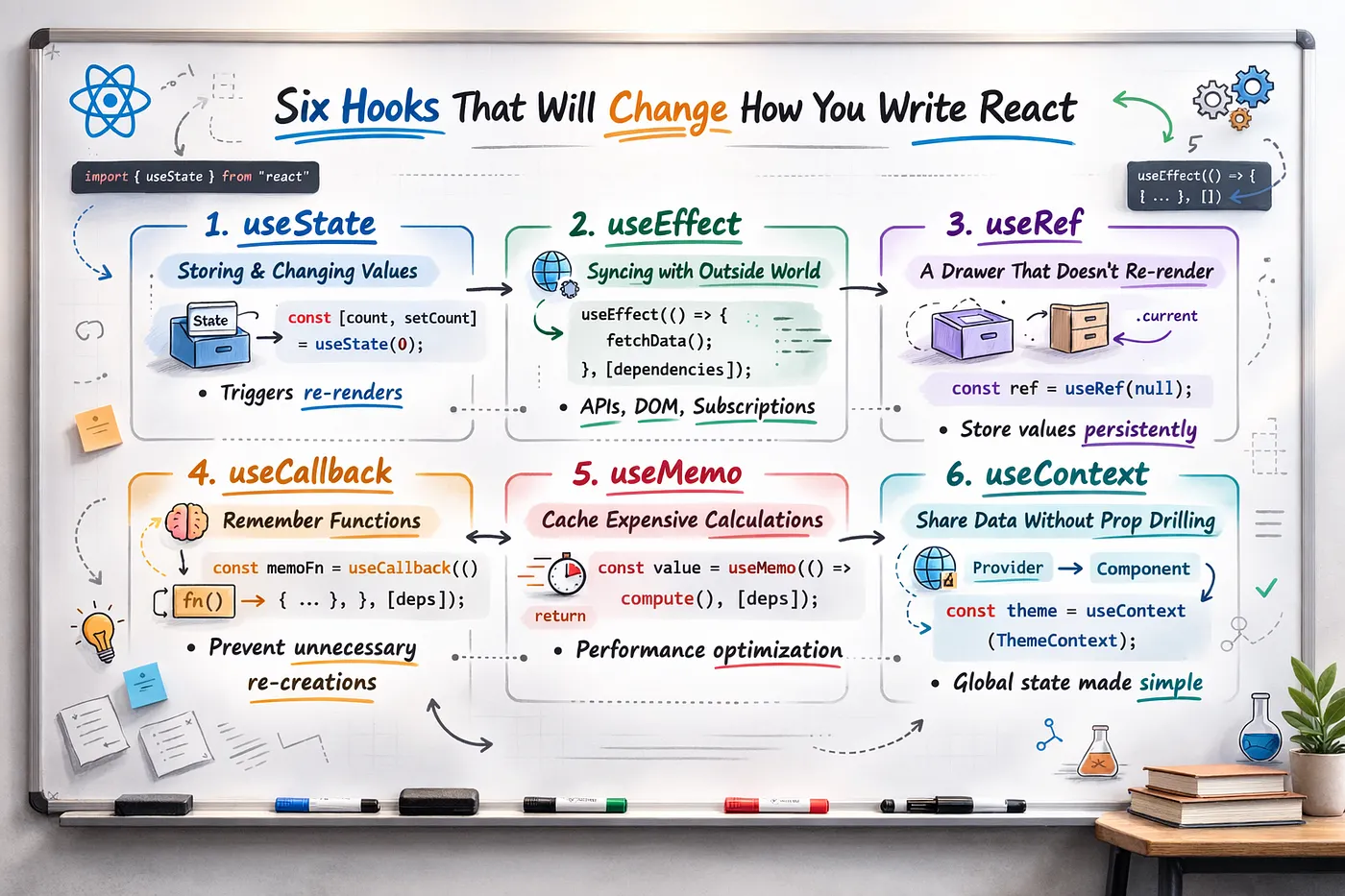
What We’re Covering
- useState — storing and changing values
- useEffect — syncing with the outside world
- useRef — a drawer that doesn’t trigger rerenders
- useCallback — remembering functions between renders
- useMemo — caching expensive calculations
- useContext — sharing data without prop drilling
01. useState — Storing Values That Change Over Time
The Problem It Solves
Let’s say you’re building a like button. When someone clicks it, the icon should fill and the count should go up. Simple enough, right? But here’s the tricky part: a regular JavaScript variable inside a function resets every single time the function runs. And in React, the function runs every time something changes. So how do you remember anything?
That’s exactly what useState was born to solve! It gives you a value that persists across renders, plus a handy way to update it that automatically triggers React to re-draw the screen.
Think of it this way: useState is like a whiteboard in a classroom. You write something on it, everyone sees it. When you erase and write something new, everyone sees the update instantly. The whiteboard doesn’t magically reset to blank every time a student raises their hand — it persists! That’s exactly how useState works for your component.
How It Works
useState gives you two things: the current value, and a setter function. You call the setter with the new value, React re-renders, and now the component has the updated value — no manual DOM manipulation needed.
import { useState } from 'react';

function LikeButton() {
  // [currentValue, setterFunction] = useState(initialValue)
  const [likes, setLikes] = useState(0);
  const [liked, setLiked] = useState(false);

  function handleClick() {
    if (liked) {
      setLikes(likes - 1);
      setLiked(false);
    } else {
      setLikes(likes + 1);
      setLiked(true);
    }
  }

  return (
    <button onClick={handleClick} style=>
      {liked ? '❤️' : '🤍'} {likes}
    </button>
  );
}
The Functional Update Pattern
Here’s a little trick that’ll save you headaches down the road: when your new state depends on the old state, don’t use the current value directly. Instead, pass a function to the setter. This ensures you always work with the freshest value, even in async scenarios where things get a bit complicated.
// ❌ Potentially stale — reads `count` from closure
setCount(count + 1);

// ✅ Always correct — React passes the latest value
setCount(prev => prev + 1);
When to Use It
- A value changes over time and the UI should reflect that change
- Tracking form inputs, toggle states, counters
- Storing fetched data or UI state (open/closed, selected tab)
When NOT to Use It
- The value doesn’t affect the UI (use
useRefinstead) - Derived values — compute them inline rather than storing
- You need deeply nested shared state (consider
useContextor a state manager)
⚠️ Heads up! State updates aren’t immediate. After calling setCount(5), if you read count on the very next line, you’ll still get the old value. Why? Because React schedules updates and batches them together for efficiency. If you need to do something with the new value, the right place is in the next render (or in a useEffect if you need to react to the change).
02. useEffect — Syncing Your Component with the World Outside
The Problem It Solves
React’s job is to render UI from state — that’s its thing! But real apps need to do so much more than just rendering. You need to fetch data from APIs, set up WebSockets, start timers, subscribe to browser events… the list goes on. These are called side effects, and they need a safe, designated place to live.
That’s where useEffect comes in! It runs after React has painted the screen, so it never blocks your render. Think of it as React saying: “Okay, I’m done drawing everything — now you can go do your external stuff!”
Real-world analogy: Imagine you move into a new apartment (component mounts). First thing you do? Call the internet provider to set up Wi-Fi (the effect). When you eventually move out (component unmounts), you cancel the service (the cleanup function). And if you move to a different unit with a new plan (dependency changes), you cancel the old contract and set up a fresh one. That’s the useEffect lifecycle in a nutshell!
Anatomy of useEffect
useEffect takes two arguments: a function (the effect), and an optional dependency array. The dependency array is the most important part — it controls when the effect runs.
import { useState, useEffect } from 'react';

function UserProfile({ userId }) {
  const [user, setUser] = useState(null);
  const [loading, setLoading] = useState(true);

  useEffect(() => {
    let cancelled = false; // prevents stale state on fast switches

    setLoading(true);
    fetch(`/api/users/${userId}`)
      .then(res => res.json())
      .then(data => {
        if (!cancelled) {
          setUser(data);
          setLoading(false);
        }
      });

    // Cleanup: runs before the next effect OR on unmount
    return () => {
      cancelled = true;
    };
  }, [userId]); // Re-run when userId changes

  if (loading) return <p>Loading...</p>;
  return <h1>{user?.name}</h1>;
}
The Dependency Array — Get This Right
The dependency array tells React when to re-run the effect. There are three forms:
// 1. No array → runs after EVERY render (usually wrong)
useEffect(() => { ... });

// 2. Empty array → runs ONCE on mount only
useEffect(() => { ... }, []);

// 3. With deps → runs when any listed value changes
useEffect(() => { ... }, [userId, searchQuery]);
When to Use It
- Fetching data when a component mounts or a prop changes
- Setting up subscriptions (WebSockets, event listeners)
- Syncing state with localStorage or external stores
- Starting/clearing timers and intervals
When NOT to Use It
- You just need a derived value — calculate it inline
- Responding to a user event — use the event handler directly
- Updating state based on state (can cause render loops)
⚠️ Watch out for the infinite loop trap! This is the #1 useEffect mistake, and we’ve all been there. Setting state inside an effect without the right dependency array creates an endless cycle: effect runs → sets state → component re-renders → effect runs again → repeat forever. Yikes! Always double-check your dependency array, and avoid including things that change on every render (like inline objects or functions).
💡 Friendly tip: Get in the habit of writing cleanup functions, even when you think you don’t need them. Trust me, they’ll save you from those sneaky bugs that pop up when components unmount unexpectedly. Plus, React’s Strict Mode (which intentionally mounts/unmounts components twice in development) will thank you for it!
03. useRef — A Drawer That Never Triggers a Rerender
The Problem It Solves
Sometimes you need to remember something across renders without triggering a rerender. Maybe you need to track a timer ID, store the previous value of a prop, or directly grab a DOM element to focus it. Using useState for this would be overkill — you’d be triggering re-renders for values that the UI doesn’t even care about!
useRef is perfect for this. It gives you a mutable container (an object with a .current property) that React never watches. You can change it as much as you want and nothing rerenders. Bonus: it’s also how you reach into the actual DOM from React code when you need to.
Here’s a fun way to think about it: useRef is like a sticky note on the side of your monitor. You can scribble on it, cross things out, update it all day long — and nobody in the room is going to react to it. It’s just there, persisting across your work sessions (renders), doing its quiet thing. Meanwhile, useState is more like an announcement in a shared Slack channel — every update pings the whole team!
Two Primary Uses
Use 1 — DOM access: Attach a ref to a JSX element and React will populate ref.current with the actual DOM node.
import { useRef, useEffect } from 'react';

function SearchInput() {
  const inputRef = useRef<HTMLInputElement>(null);

  useEffect(() => {
    // Auto-focus the input when the component mounts
    inputRef.current?.focus();
  }, []);

  return <input ref={inputRef} placeholder="Search..." />;
}
Use 2 — Persistent mutable values: Store values that need to persist across renders but shouldn’t cause re-renders when they change — like timer IDs, previous values, or internal counters.
import { useState, useRef } from 'react';

function Stopwatch() {
  const [time, setTime] = useState(0);
  // useRef to store the interval ID — no rerender needed
  const intervalRef = useRef<number | null>(null);

  function start() {
    intervalRef.current = setInterval(() => {
      setTime(t => t + 1);
    }, 1000);
  }

  function stop() {
    clearInterval(intervalRef.current!);
  }

  return (
    <div>
      <p>Time: {time}s</p>
      <button onClick={start}>Start</button>
      <button onClick={stop}>Stop</button>
    </div>
  );
}
When to Use It
- You need direct DOM access (focus, scroll, measurements)
- Storing values that shouldn’t trigger rerenders (timer IDs, previous state)
- Breaking out of stale closure issues in callbacks
When NOT to Use It
- The value does need to trigger a UI update — use
useState - As a way to “skip” the React rendering model — it creates bugs
- Modifying DOM directly when React should manage it
⚠️ Important to remember: Changing ref.current does NOT cause a rerender. This is actually a feature, not a bug! But it also means if you try to use a ref to display something to the user and then update it, the screen won’t refresh. For anything visual, stick with useState — it’s designed for exactly that.
04. useCallback — Remembering Functions Between Renders
The Problem It Solves
Here’s something that catches a lot of folks off guard: in JavaScript, two functions that do exactly the same thing are NOT considered equal to each other. Wild, right? Every render, React recreates your component’s functions from scratch — and each new function gets a brand new reference in memory.
Why does this matter? Well, when you pass a function as a prop to a child component, React sees a “new” function every single render — even though the logic hasn’t changed at all! If that child is wrapped in React.memo (trying to be smart about rerenders), it’ll still rerender because the props look different. useCallback comes to the rescue by memoizing (caching) the function and returning the same reference as long as its dependencies don’t change.
Picture this: You’re a manager who needs to give your team a policy document. Without useCallback, it’s like printing a fresh copy every single time you walk into the office — even though the content is identical. What a waste of paper (and everyone’s attention)! useCallback is like laminating the document once and handing out that same copy until the policy actually changes. Same content, same physical document, way less disruption.
import { useState, useCallback, memo } from 'react';

// This child only re-renders when its props actually change
const AddToCartButton = memo(({ onAdd, label }) => {
  console.log('Button rendered');
  return <button onClick={onAdd}>{label}</button>;
});

function ProductList() {
  const [cartCount, setCartCount] = useState(0);
  const [filter, setFilter] = useState('');

  // Without useCallback: new function on every render → button always re-renders
  // With useCallback: same function reference while cartCount is stable
  const handleAddToCart = useCallback(() => {
    setCartCount(prev => prev + 1);
  }, []); // No deps needed — uses functional updater

  return (
    <div>
      <p>Cart: {cartCount} items</p>
      {/* Changing the filter won't re-render AddToCartButton */}
      <input onChange={e => setFilter(e.target.value)} />
      <AddToCartButton onAdd={handleAddToCart} label="Add to Cart" />
    </div>
  );
}
When to Use It
- Passing callbacks to child components wrapped in
React.memo - A function is a dependency of a
useEffect - You’re seeing unnecessary re-renders in profiler output
When NOT to Use It
- The child isn’t memoized —
useCallbackhas no effect - Wrapping every single function by default — it adds overhead
- Simple components where re-renders are cheap anyway
💡 Cool fact: useCallback(fn, deps) is actually just shorthand for useMemo(() => fn, deps). They’re the exact same optimization — one’s just specifically for functions, the other for any values. And here’s the kicker: you need BOTH useCallback and React.memo working together for the optimization to do anything. Using one without the other? That’s just extra code with no benefit!
05. useMemo — Caching Expensive Calculations
The Problem It Solves
Picture this: you have a component that renders a table of 10,000 sorted and filtered transactions. Every time ANY state changes in the component — even something totally unrelated, like a tooltip opening — React re-runs your entire render function. That means your expensive sort-and-filter operation runs again. And again. And again. Ouch!
useMemo is your performance superhero here. It caches the result of that computation and only recalculates when the data it depends on actually changes. Think of it as a smart cache that somehow knows exactly when it’s stale and needs refreshing.
Let’s use a cooking analogy: You’re a chef at a busy restaurant. You calculate the day’s specials menu based on what’s in stock. But you don’t recalculate after every single table orders — that would be exhausting! You only update the specials when the stock actually changes. useMemo works the same way. It’s like your brain’s cache — you store the result (“today’s specials”) and only redo the work when the inputs (“stock inventory”) change.
import { useState, useMemo } from 'react';

function TransactionTable({ transactions }) {
  const [searchQuery, setSearch] = useState('');
  const [tooltipOpen, setTooltip] = useState(false);

  // This only recalculates when transactions or searchQuery change —
  // NOT when tooltipOpen toggles (which is a separate concern)
  const filteredAndSorted = useMemo(() => {
    return transactions
      .filter(tx =>
        tx.description.toLowerCase().includes(searchQuery.toLowerCase()))
      .sort((a, b) => b.date - a.date);
  }, [transactions, searchQuery]);

  return (
    <div>
      <input onChange={e => setSearch(e.target.value)} />
      {filteredAndSorted.map(tx => <TransactionRow key={tx.id} {...tx} />)}
    </div>
  );
}
Also Useful: Referential Stability for Objects
useMemo isn’t just for heavy computation. It’s also useful when you need to pass an object or array to a child component without it recreating every render — since objects always get new references in JS.
// ❌ New object on every render — children see it as "changed"
const config = { theme: 'dark', lang: userLang };

// ✅ Same object reference unless userLang actually changes
const config = useMemo(
  () => ({ theme: 'dark', lang: userLang }),
  [userLang]
);
When to Use It
- Filtering or sorting large datasets on render
- Computing derived data that’s expensive to recalculate
- Creating stable object/array references for memoized children
When NOT to Use It
- The computation is trivially fast — memoization adds overhead too
- You’re memoizing everything “just in case” — measure first
- The dependencies change so frequently the cache never hits
⚠️ A word of caution about optimization: useMemo and useCallback aren’t free — React has to store the cached value and check dependencies on every render. For simple, quick operations, this overhead can actually be SLOWER than just recalculating. So here’s the golden rule: always profile with React DevTools before reaching for these hooks. The React team themselves say it best: don’t memoize unless you’ve actually measured a performance problem. Premature optimization is a real thing!
06. useContext — Sharing Data Without Prop Drilling
The Problem It Solves
Picture this scenario: you have user authentication data at the top level of your app. Now, way down in the component tree, a tiny button buried inside a sidebar inside a layout inside a dashboard needs to know the user’s name. The old-school approach? Pass it as a prop through every. single. component. in between — even the ones that don’t care about it at all! This is called prop drilling, and it’s honestly a maintenance nightmare.
Good news: useContext (paired with React.createContext) is React’s built-in solution to this mess! You define a context at a high level, wrap your component tree in a Provider, and boom — any component anywhere in that tree can read directly from the context. No prop threading, no headaches.
Think of it like WiFi: Context is like a building’s WiFi network. The router (Provider) sits in one central spot, broadcasting the signal. Any device anywhere in the building (any nested component) can connect directly to it — no need for ethernet cables running through every single room (props)! You don’t need each floor to manually “pass down” the WiFi signal. It’s just there, available wherever you are.
Building a Full Auth Context
import { createContext, useContext, useState } from 'react';

// 1. Define the shape of your context
type AuthContextType = {
  user: User | null;
  login: (user: User) => void;
  logout: () => void;
};

// 2. Create the context with a sensible default
const AuthContext = createContext<AuthContextType>(null!);

// 3. Build a Provider component that owns the state
export function AuthProvider({ children }) {
  const [user, setUser] = useState<User | null>(null);

  const login = (userData: User) => setUser(userData);
  const logout = () => setUser(null);

  return (
    <AuthContext.Provider value=>
      {children}
    </AuthContext.Provider>
  );
}

// 4. Export a clean custom hook — never expose raw context
export function useAuth() {
  const ctx = useContext(AuthContext);
  if (!ctx) throw new Error('useAuth must be used within AuthProvider');
  return ctx;
}
// UserAvatar.tsx — deeply nested, zero prop drilling
function UserAvatar() {
  const { user, logout } = useAuth();

  return (
    <div>
      <img src={user?.avatarUrl} alt={user?.name} />
      <button onClick={logout}>Log out</button>
    </div>
  );
}
When to Use It
- Auth state, theme, locale — truly global data
- Avoiding prop drilling 3+ levels deep
- Data that rarely changes but is needed everywhere
When NOT to Use It
- Data is only shared between 2–3 nearby components — just use props
- As a replacement for a proper state manager in large apps
- For frequently-changing data (every context update rerenders all consumers)
⚠️ Performance tip: Here’s something to watch out for — when a Context value changes, EVERY component that uses that context re-renders, even if they only care about one tiny part of it. So if you stuff everything into one massive context (user + theme + cart + notifications + kitchen sink), you’ll get cascading rerenders everywhere. Not fun! The fix? Split things into smaller, focused contexts (AuthContext, ThemeContext, CartContext), or use useMemo to keep your context value stable.
💡 Pro pattern: Always wrap your raw context in a custom hook (like useAuth instead of useContext(AuthContext)). This gives you a chance to add helpful validation, throw friendly error messages when something’s wrong, and keep the implementation details private. Your component doesn’t need to know all the plumbing — it just wants the data!
You’ve Got This!
And there you have it! These six hooks are the foundation of nearly every React component you’ll ever write. Here’s your quick reference cheat-sheet:
| Hook | What it does |
|---|---|
useState |
Store values that change and drive UI updates |
useEffect |
Sync with the outside world after renders |
useRef |
Persist values or grab DOM nodes without rerenders |
useCallback |
Memoize functions for stable child prop references |
useMemo |
Cache expensive computations between renders |
useContext |
Share data globally without prop drilling |
The best way to really internalize all this? Build something! Start with a small feature and work your way up. Every bug you encounter — whether it’s a missing dependency or an accidental infinite loop — will teach you way more than any article ever could. That’s how we all learned!
You’ve got all the knowledge you need now. Go forth and build something awesome! 🚀
Happy building!